
Cheesy Road Game: Download for Android & iOS
Three ways to play Cheesy Road on your phone — Android APK, iOS PWA, and mobile browser. No marketing fluff, just working methods. By Cheesy Road Editorial Team.
A Cleaner Mobile Setup Routine
Cheesy Road mobile access should feel straightforward before any money enters the account. Start with the casino website in a normal browser, search the lobby, and confirm that the game opens without asking for extra files. If the casino offers an Android app, download it only from the operator domain after checking the URL, license footer, and support links. Third-party APK libraries are not a shortcut; they are an unnecessary risk for a game that already runs through a server connection.
Once the game loads, spend a minute checking comfort rather than speed. The lane, controls, balance area, and cash-out decisions need to stay visible on the screen you actually use. A PWA shortcut can be useful if you return often, but it should not hide cashier terms or bonus limits. The best mobile setup is the one that keeps Cheesy Road readable, lets you pause easily, and makes it obvious when you are in demo mode or playing with a real balance.
The Honest Truth About Cheesy Road Mobile
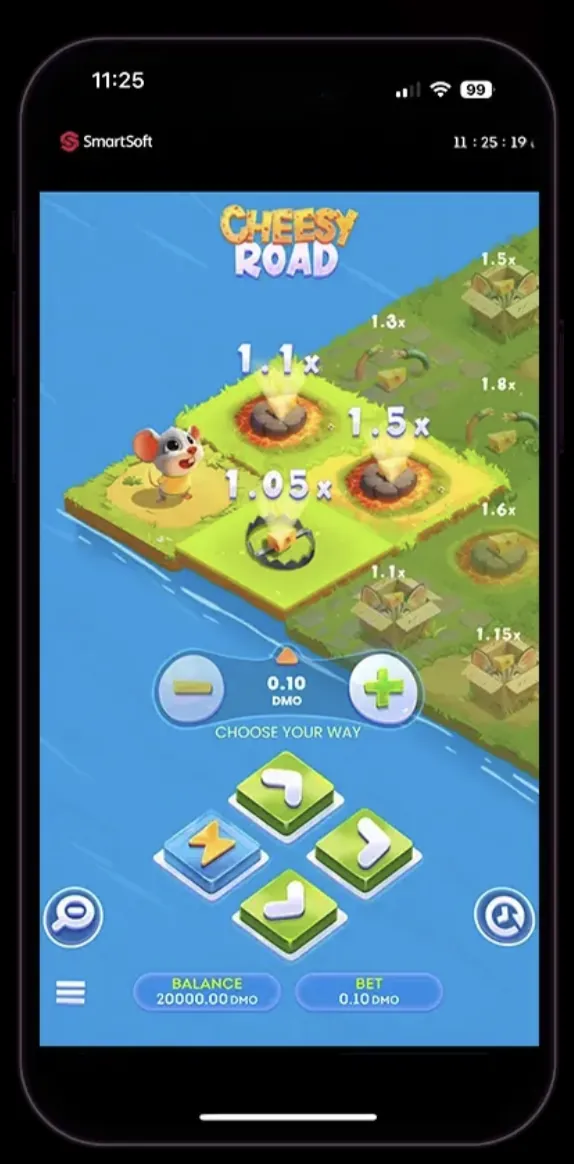
Cheesy Road running on iPhone via mobile browser — same game, touch-optimized interface
Cheesy Road is built with HTML5 by SmartSoft Gaming. The entire game runs on remote servers — your device simply displays the result. This means it works on any modern phone with a browser, regardless of operating system. The gameplay, RTP, and RNG are identical whether you're on a $200 Android phone or the latest iPhone.
So what are your actual options for mobile play? There are three, and each has trade-offs. Casino APK apps for Android give you the closest experience to a native app. On iOS, you can create a PWA shortcut that looks and feels like an app. And the simplest route — just open it in your mobile browser. Below, we break down each method step by step.
Option 1: Android APK Download
Several casinos that carry Cheesy Road offer their own Android APK files. These aren't on Google Play because Google restricts real-money gambling apps in most countries. Instead, you download the APK directly from the casino's website and install it manually. This is called "sideloading" and it's perfectly normal for casino apps.
Step 1: Visit the Casino on Your Phone
Open your mobile browser (Chrome, Firefox, or Samsung Internet) and go to the casino website. Look for a "Mobile App" or "Download" link — it's usually in the footer or the hamburger menu. Don't search for casino APKs on Google. Third-party download sites frequently bundle malware with casino APKs.
Step 2: Download the APK File
Tap the Android download button on the casino's official page. Your browser may show a warning that the file "can harm your device" — this is a standard Android warning for any APK downloaded outside Google Play, not an indication of actual malware. The file is typically 15-40 MB.
Step 3: Enable Unknown Sources
Before the APK can install, Android needs permission. On Android 8+: go to Settings > Apps > your browser > Install Unknown Apps > toggle ON. On older Android versions: Settings > Security > Unknown Sources > enable. You can disable this again after installation.
Step 4: Install and Launch
Open the downloaded file from your notification bar or Downloads folder. Tap "Install" and wait 10-30 seconds. Once installed, open the app, log in with your existing casino account (or register a new one), and search for "Cheesy Road" in the game library. The game loads inside the app exactly as it would in a browser.
Option 2: iOS PWA Installation (iPhone & iPad)
Apple's App Store policies make it nearly impossible for online casinos to list real-money gambling apps in most regions. The workaround is a Progressive Web App (PWA) — a browser-based shortcut that behaves like a native app. It gets its own icon on your home screen, opens in full-screen mode (no browser toolbar), and supports push notifications on iOS 16.4+.
Step 1: Open the Casino in Safari
This only works with Safari. Chrome and Firefox on iOS don't support the "Add to Home Screen" feature with full PWA capabilities. Go to the casino website using Safari on your iPhone or iPad.
Step 2: Tap the Share Button
Tap the share icon at the bottom of Safari (the square with an upward arrow). Scroll down in the share sheet until you see "Add to Home Screen." If you don't see it, scroll right on the bottom row of icons.
Step 3: Add to Home Screen
Tap "Add to Home Screen." You can rename the shortcut if you want. Tap "Add" in the top-right corner. The casino icon appears on your home screen alongside your other apps.
Step 4: Launch and Play
Tap the new icon. The casino opens in full-screen mode without Safari's address bar or navigation controls. Log in, find Cheesy Road in the game library, and play. The experience is nearly identical to a native app — the main difference is that game data isn't cached offline.
PWAs on iOS have one limitation worth mentioning: if you clear Safari's website data (Settings > Safari > Clear History and Website Data), you'll be logged out of the PWA. Your account and funds aren't affected — you just need to log in again next time you open it.
Option 3: Play Directly in Your Mobile Browser
The simplest approach requires zero installation. Just open the casino website in any modern mobile browser, log in, and play Cheesy Road. SmartSoft Gaming built the game with HTML5 specifically so it adapts to any screen size. The touch controls work the same way — tap direction arrows, tap cash out. No download, no setup, no storage space used.
Advantages
- No download or installation required
- Works on any phone with a modern browser
- Always the latest version — no app updates
- Zero storage space used on your device
- Switch between casinos without multiple apps
Disadvantages
- Browser toolbar takes up screen space
- No push notifications for promotions
- Slightly slower load times vs. native app
- Must type the URL or use a bookmark each time
- Accidental tab closure can interrupt sessions
Browser recommendation: Chrome and Safari deliver the best performance for HTML5 casino games. Firefox works fine but occasionally has minor rendering differences. Avoid using Opera Mini or other data-compression browsers — they can interfere with the game's real-time communication with the server.
If you want a quick-access shortcut without the full PWA setup, most browsers let you bookmark the casino's Cheesy Road page directly. On Chrome for Android, tap the three-dot menu and select "Add to Home screen" for a simple bookmark shortcut.
System Requirements
Cheesy Road is lightweight compared to 3D slots or live dealer games. Since the heavy lifting happens server-side, even mid-range phones from 2020 handle it without issues. Here are the minimum and recommended specs:
| Component | Minimum | Recommended |
|---|---|---|
| Android | Android 7.0 (Nougat) | Android 11+ |
| iOS | iOS 14 | iOS 16+ |
| RAM | 2 GB | 4 GB+ |
| Storage (APK) | 50 MB free | 100 MB free |
| Storage (Browser) | No space needed | No space needed |
| Screen | 4.7" / 720p | 5.5"+ / 1080p |
| Internet | 3G / 1 Mbps | 4G/5G or Wi-Fi |
| Browser | Chrome 80+ / Safari 14+ | Chrome 100+ / Safari 16+ |
Data usage is minimal. A typical Cheesy Road session of 30 minutes uses approximately 10-20 MB of mobile data. The game doesn't stream video — it's mostly lightweight commands between your device and the server. That said, a stable connection matters more than speed. Intermittent connectivity can cause bet confirmations to lag or fail, which is frustrating when you're trying to cash out at the right moment.
Mobile vs Desktop: What's Different?
The short answer: nothing that affects your odds. The RNG, RTP, and payout calculations all happen on SmartSoft Gaming's servers regardless of your device. But the playing experience does differ in some practical ways:
| Feature | Mobile | Desktop |
|---|---|---|
| RTP & Odds | Identical (server-side) | Identical (server-side) |
| Controls | Touch — tap arrows and buttons | Mouse click |
| Layout | Portrait, stacked vertically | Landscape, side-by-side panels |
| Screen Real Estate | Smaller — bet panel overlaps game board | Larger — all elements visible simultaneously |
| Response Time | Slightly slower on cellular data | Typically faster on wired/Wi-Fi |
| Multitasking | Can switch apps but may reload game | Multiple tabs open simultaneously |
| Notifications | Casino push alerts (APK/PWA only) | Browser notifications (if enabled) |
| Session Stability | May drop on poor connection | Generally more stable |
| Convenience | Play anywhere, anytime | Tied to your computer |
One genuine mobile advantage: the touch interface feels more intuitive for Cheesy Road specifically. Tapping direction arrows on a touchscreen is quicker than clicking with a mouse. Several players in forums report that the mobile experience feels more responsive for fast cash-out decisions, though this is subjective and likely a placebo effect since the server-side processing time is the same.
The main desktop advantage is screen size. On a phone, you sometimes need to scroll to see your full bet history or balance. On desktop, everything is visible at once. If you're tracking patterns or managing a strict bankroll strategy, the desktop layout gives you better information density.
Troubleshooting Common Mobile Issues
Game Won't Load
Clear your browser cache (Settings > Browser > Clear Data). Disable any ad blockers or VPN that might interfere with the casino's connection. Try a different browser. If using a casino app, uninstall and reinstall it. The game requires JavaScript enabled — check that it's not disabled in your browser settings.
APK Won't Install
Ensure "Unknown Sources" or "Install Unknown Apps" is enabled for your browser. Check that you have enough storage space (at least 50 MB free). Verify you downloaded the APK from the official casino site. If the file appears corrupted, delete it and download again on a stable connection.
Game Freezes During Play
Don't panic — your bet is recorded server-side. Close and reopen the app or browser. Log back in and check your balance. If a round was in progress, it will either have completed (check your transaction history) or been voided. Contact casino support if your balance seems incorrect.
Touch Controls Not Responding
This usually indicates the game interface hasn't fully loaded. Wait 5-10 seconds after the game board appears before tapping. If arrows remain unresponsive, refresh the page. On older phones with less RAM, close other apps running in the background to free up memory for the game.
PWA Keeps Logging Me Out (iOS)
iOS aggressively manages PWA storage. Avoid clearing Safari data unless necessary. If you're on iOS 17+, the PWA data persistence has improved significantly. Make sure your iPhone isn't in Low Power Mode, which can cause Safari to purge cached data more aggressively.
Slow or Laggy Gameplay
Switch from cellular data to Wi-Fi if available. Close background apps consuming bandwidth (streaming, downloads). If on Wi-Fi, move closer to your router. Check if the casino is running scheduled maintenance — laggy gameplay across all games usually means server-side issues, not your device.
If none of the above solves your issue, take a screenshot of the error and contact the casino's live chat support. Most casinos resolve technical issues within minutes. Make sure to mention your device model, OS version, and browser — this helps their support team diagnose the problem faster.
Content Update History
- — Verified all mobile access methods, updated system requirements for latest OS versions
- — Initial publication with Android APK, iOS PWA, and browser guides
Frequently Asked Questions
Is there an official Cheesy Road app on the App Store or Google Play?
No. Cheesy Road is a server-based HTML5 game by SmartSoft Gaming. It doesn't have a standalone app on any app store. You access it through casino platforms — either via their Android APK apps, as a PWA shortcut on iOS, or directly in your mobile browser. Anyone claiming to offer a "Cheesy Road APK" as a standalone download is not distributing an official product.
Is it safe to install casino APK files on Android?
APK files from reputable licensed casinos are generally safe. The key rule: download only from the official casino website. Never from third-party APK repositories, Telegram channels, or random download links. The casino's APK is essentially a wrapper around their mobile website with added push notification support. Before downloading, verify the casino holds a valid gambling license (Curacao, MGA, or similar).
Why can't I find Cheesy Road on the Apple App Store?
Apple restricts real-money gambling apps in most countries. Only casinos with specific regional licenses (like UK Gambling Commission) can list on the App Store in those regions. Most online casinos use PWAs instead — web-based apps that install through Safari and work nearly identically to native apps. See our iOS PWA guide above for the installation steps.
Does Cheesy Road work the same on mobile as on desktop?
Yes — the game logic is identical. RTP, RNG, multipliers, and payout calculations all happen server-side, not on your device. The only differences are visual: portrait layout on mobile, touch controls instead of mouse clicks, and a slightly condensed interface. Your odds of winning or losing are exactly the same regardless of which device you use.
How much storage space does the casino APK need?
Typically 15-40 MB for the initial download, expanding to 50-80 MB installed. Cheesy Road itself doesn't add to this because it's a server-based game — the game data streams from the casino's servers each time you play. If storage is a concern, playing through the mobile browser uses zero storage space on your device.
Can I play Cheesy Road offline on my phone?
No. Cheesy Road requires a constant internet connection. All game logic — the RNG, bet processing, multiplier calculations, trap placement — runs on SmartSoft Gaming's servers. Your device is essentially a display that sends your taps and receives the results. Without internet, the game won't load. You can try the free demo to test how the game runs on your connection before playing with real money.
Related Guides
- Try Cheesy Road for free — test mobile performance with the demo before depositing
- How to play Cheesy Road — complete rules, interface breakdown, and game mechanics
- Bonuses and promo codes — verified welcome offers with wagering breakdown
Affiliate Disclosure: Links to casinos on this page are affiliate links. We earn commission when you deposit. This doesn't affect our editorial assessment or the information provided. Full disclosure.
Download Outlook for Mobile Players
Cheesy Road does not need a mystery file on your phone. The optimistic approach is to pick one safe path and stick to it. If the operator has an app, the download link should come from the same place you trust for payments: the official domain, the account menu, or the help pages. If you cannot trace an APK back to the operator site, treat it as noise. Most problems people call “game issues” are really access issues created by rushed installs.
Browser play is often enough, and it has one underrated benefit: it is easier to pause. A home-screen shortcut can be quick without taking extra permissions. If you do install an app, keep permissions tight and test in demo first. Once the access path is stable, shift attention to the real safety levers: smaller unit size, a written stop point, and no stake increases just because you are on a phone. Safe setup is not exciting, but it keeps play predictable.